
How to Use Google Search Console to Continuously Improve SEO

By Tyler Golberg | February 8, 2023 | Strategy | Reading Time: 7 minutes

Utilizing Google Search Console is a highly impactful digital marketing tactic for enhancing the SEO of your website. When people use search engines, they typically express their intent through the keywords they use. By strategically optimizing your website for relevant keywords, you can ensure being the foremost provider to fulfill the user’s requirements.
This is very important to any digital marketing campaign considering that over 90% of online experiences begin with a search engine. But this strategy doesn’t happen overnight.
If you’re looking for a MUCH FASTER way to use this strategy, check out our new article on using AI to improve SEO using Google Search Console.
Table of Contents
Daily Improvements for Better Long-Term SEO Results
Search engines are like the crockpots of digital marketing. They are often slow to change search results or prominently show new content.
That is precisely why SEO campaigns need to be considered a long-term strategy that builds on itself. Make continuously improving SEO a part of your daily habits. If you can improve your site’s SEO by 1% daily, the results will be profound after only a year.
“The whole principle came from the idea that if you broke down everything you could think of that goes into riding a bike, and then improve it by 1 percent, you will get a significant increase when you put them all together.”
James Clear
The quote above is related to competitive cycling but the same principle applies to SEO strategies. Lots of small improvements make a big impact.
Identifying Keyword Opportunities
In the upcoming section, we will explore methods for identifying keyword opportunities, enabling you to pinpoint areas for enhancement. To strategize improvements for each keyword phrase, you can employ the subsequent steps.
- Open an incognito/private window to ensure your search history doesn’t affect these results.
- Open up Google.com and search for the desired keyword phrase.
- Copy down any of the questions from the “People also ask” section. Every relevant question and the accompanying answer should be included on your landing page.
- Open up the links to the top 5-10 results. Review each article to see which topics are covered, types of examples, cited resources, videos, graphics, and more. Your landing page needs to do a better job of covering every one of these aspects but don’t plagiarize. Get inspiration and make it better! And pay particular attention to the top 3 results.
Search Engine User Intent Questions
The main objective is to ensure comprehensive coverage of a search topic, leaving no room for users to seek information elsewhere. To maximize the effectiveness of this approach, put yourself in the shoes of the end-user and consider how each landing page caters to their needs.
- Does the landing page address the main intentions of the searcher?
- Is the searcher able to find answers to all of their questions on this topic?
- Is the content easy to understand and concise? Nobody likes complex wordy articles with a bunch of fluff.
- Is the landing page engaging? A big block of text won’t do it. Try adding videos, graphs, quotes, interactive tools, and more to make the user experience top notch.
Remember that this doesn’t need to be a big overhaul of every landing page. Many small improvements will yield great results. Plus, this approach is easier to fit into busy schedules.
Now let’s look at how to find keyword phrase opportunities.
Google Search Console Performance Report Insights
GSC (Google Search Console) is one of the few resources to view direct data from Google. If you haven’t added it to your website yet, get it done today. It is free and won’t start tracking search data for your website until it is set up.
If you already have GSC configured, go to the Performance tab for the next sections.
Expand on Your Top Ranking Keywords
It is difficult to rank at the top of any keyword search. Once you achieve that feat, don’t get complacent. Expanding on that keyword phrase can be very valuable and help solidify that top spot.
If you already have the top spot for the base keyword phrase, it should be easier to rank at the top for any longer versions of that phrase. For example, a website ranking at the top for “home maintenance” should have a clear path to rank well for “home maintenance checklists” or “home maintenance schedules.”
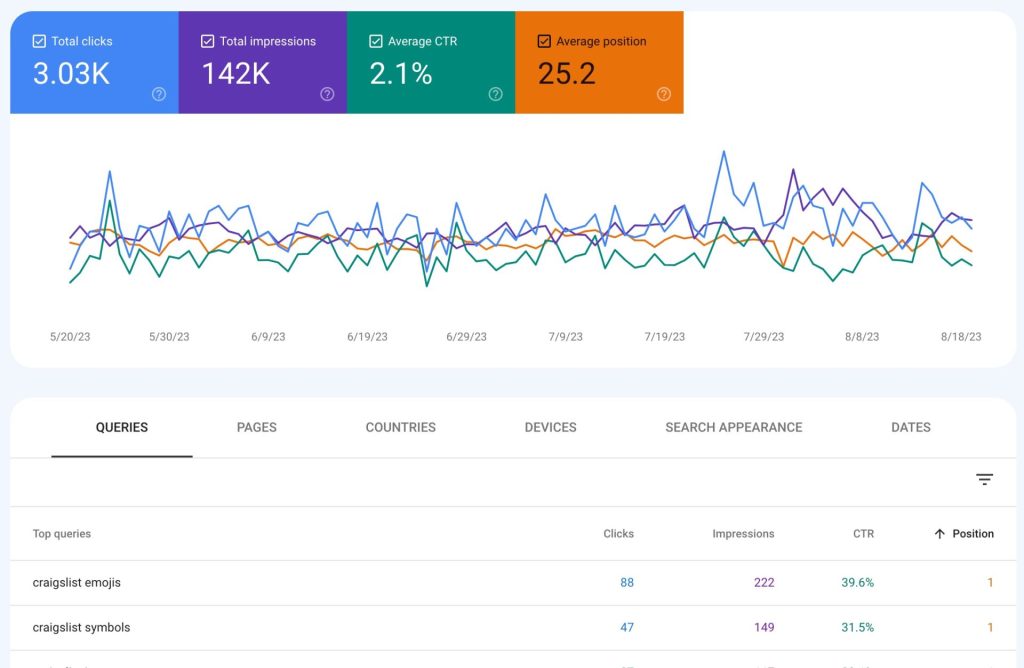
- In the “Performance” tab of GSC, click the Average Position to make it visible.
- Then click Position in the table below the graph to order the results by ranking.
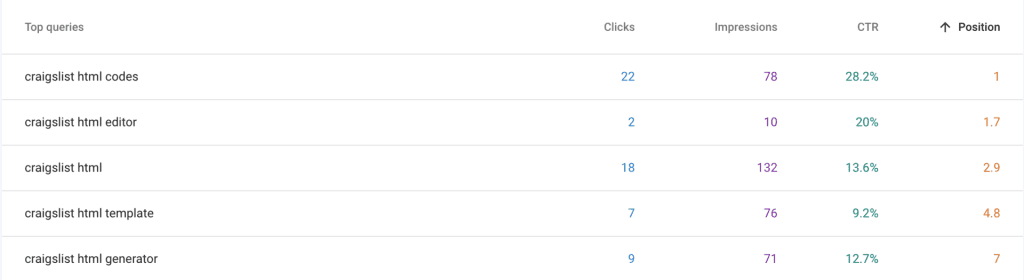
- Copy down any search phrase you feel could be expanded.
- For each search phrase, click “+ New” to add a new “Query” filter.
- Enter the phrase into the “Queries containing” field.
- Review the results and then make a list of any usable long-tail versions of the base keyword phrase.
- Next, go to Google.com and enter the base phrase but don’t hit the search button just yet. Instead, look at how Google auto-suggests longer versions of the base phrase. Copy any relevant phrases to the same list.
- Content for these phrases should be added to the landing page for the base keyword phrase or create new content pages that interlink with that landing page. If you decide to create new pages, keep in mind that these don’t all have to be long blog posts. They can start out as simple FAQs, tips, glossary terms, etc. Short-form content is faster to implement and can be improved later to be more comprehensive.
TIP: If you are unsure what is the top page on your site for a particular phrase, click on that phrase in GSC and then click the “Pages” tab to view the top results.
Expand on Table of Contents Keywords
A website table of contents can be a simple effective strategy to expand the reach of one article. Each anchor link gives Google a different target that can show up independently of the main URL in search results. That means the same article can show up multiple times for one search and help expand to new searches.
The following only works if your website has a table of contents on posts. If you don’t have one, I highly recommend adding one and then coming back to this strategy in a month.
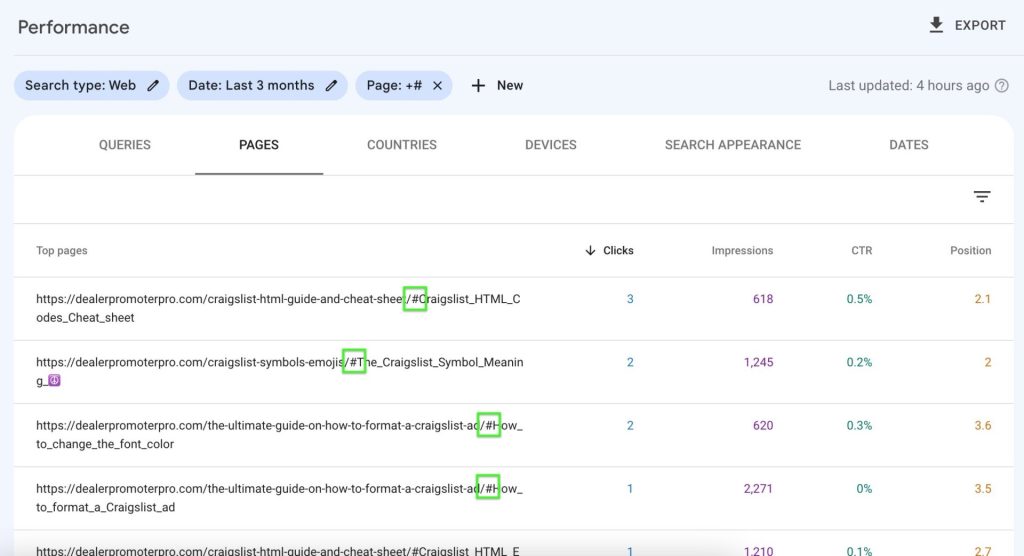
- In the “Performance” tab of GSC, click “+ New” to add a new “Page” filter.
- Enter only the pound sign (i.e. “#”) in the blank field and click “Apply.”
- If you click the “Page” tab, you’ll see all of the bookmark links that rank on Google.
- Click on the “Queries” tab to see the related search phrases. Copy any usable phrases to your list and make the corresponding improvements to the main article. Try to bolster the content in regard to that phrase in the section related to that bookmark link.
Keywords That Almost Rank on Page One
A long-running joke is that the best place to hide a dead body is on page 2 of Google. That might no longer be relevant with Google’s infinite scroll update but I digress.
The key takeaway is that a small number of users venture far into Google’s search results. The highest-ranked results capture more than 25% of the total traffic for each search query. Enhancing your position from 15th to 5th place can significantly boost clicks by 10 times.
This strategy aims to identify the phrases in which your site’s pages are currently positioned between 10-30 and enhance those specific pages to achieve higher rankings. It is more achievable to reach the top positions with content that is already performing reasonably well, as opposed to creating entirely new content.
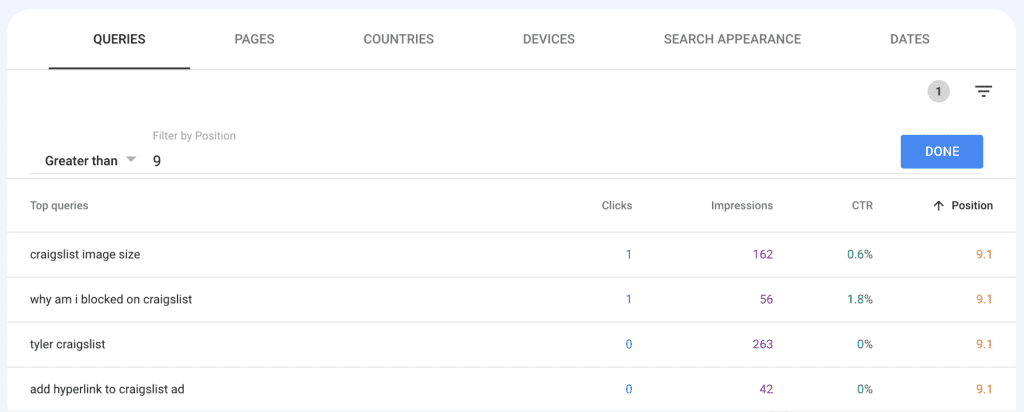
- In the “Performance” tab of GSC, click on the “Position” metric to make sure it is visible for the data table below the graph.
- Click on the little filter icon on the far right and activate the “Position” filter. Use “Greater than” with position 9.
- Review the results for keyword opportunities.
Trending and New Keywords Starting to Rank
It is incredibly important to continually create new content for your site. Each piece of content is a new search target for Google searches and will provide new insights.
Once a month, check GSC to see how your website is ranking for new phrases. Nurturing these new phrases early on can help you determine the low-hanging fruit.
Double down on search phrases that continue to improve. Sometimes the competition is simply too tough for certain phrases so focus your resources where they can matter most.
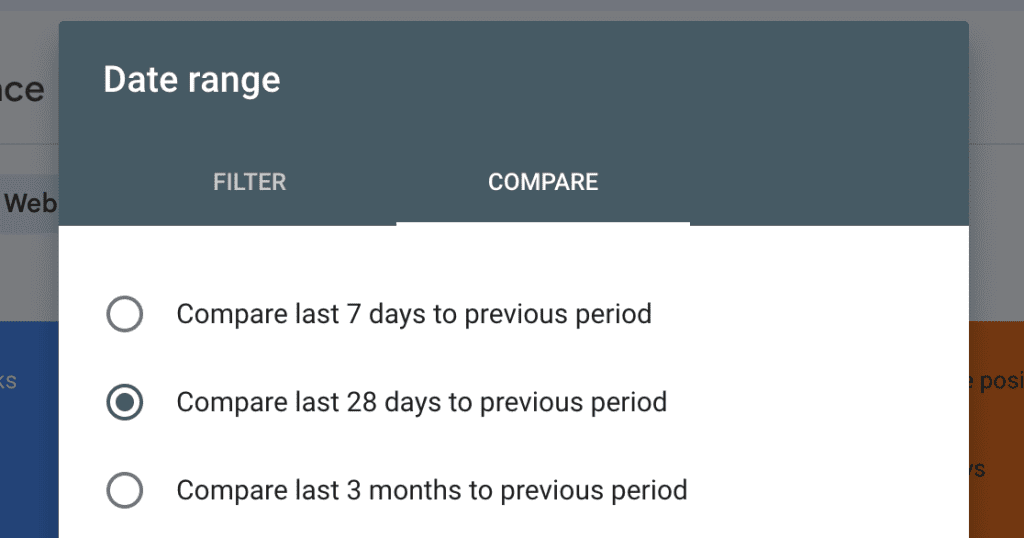
The steps below will work to find both new ranking keywords and keywords that are trending in a positive direction.
- In the “Performance” tab of GSC, click on the “Date: Last 3 months” filter at the top to edit.
- Click “Compare” and select “Compare last 28 days to previous period.”
- In the data table, click on the “Impression Difference” to sort from highest to lowest.
- Review the data to see which keyword phrases are trending the most in the last 28 days.
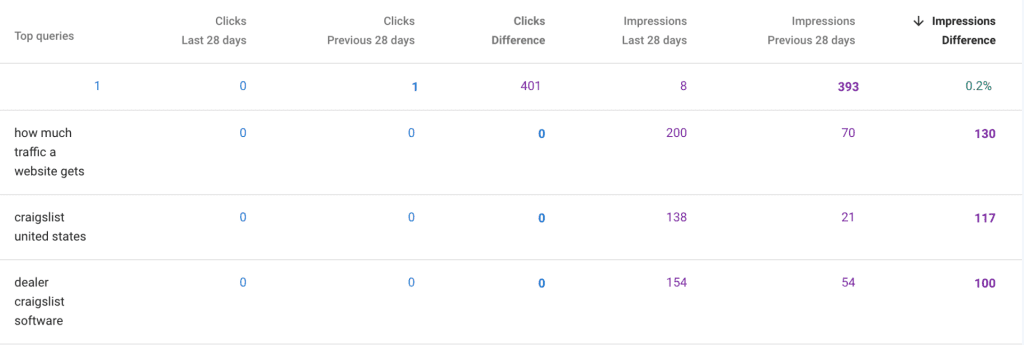
Keywords that Rank in Local Searches
GSC doesn’t track data specific to local searches but there is a fix. You can use a UTM link on your Google Business Profile to gain insight into local search queries on GSC.
After adding that special link to your Google Business Profile, try the following steps to find local keywords that are getting traction.
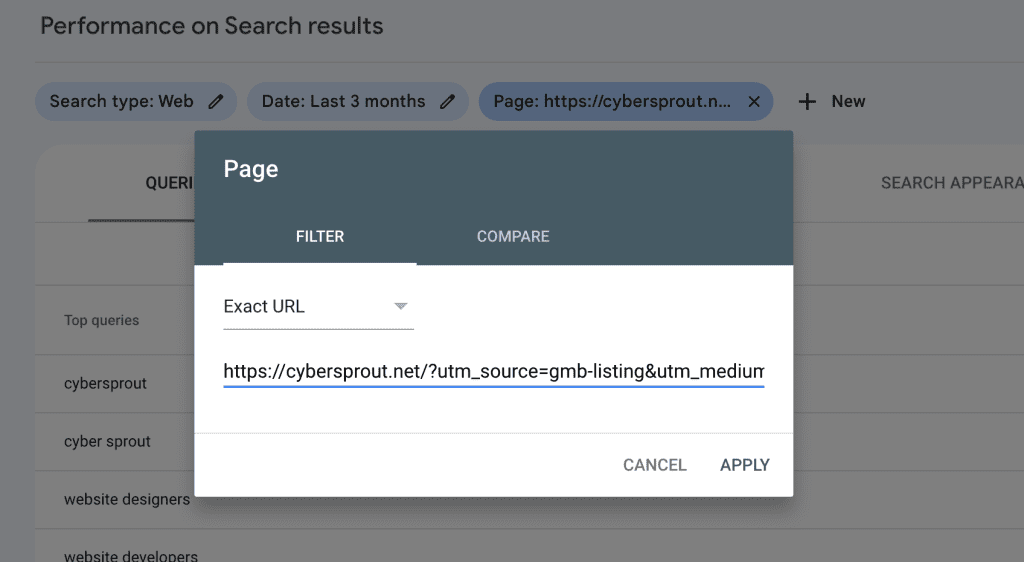
- In the “Performance” tab of GSC, click on the “Pages” tab and select your unique link from the list. You can also copy the UTM link from your Google Business Profile page and create a Page filter.
- Click on the “Queries” table to review keywords ranking for local searches.
Website Experience Feedback
Google regularly checks your site for SEO issues and sends email alerts to GSC account admins. These issues tend to be easy to remedy but can have a big impact on site performance. Google will even recommend solutions to these issues.
Common Google Search Console Warnings
- A page is loading too slowly
- A page is not mobile friendly
- A page is not being shown in Google’s search results
- A page is not being found
- A redirect is not working correctly
- Security or malware concerns
You can find a complete list of the alerts and remedies to each here.
Continuous SEO Improvements
Whether it is user experience fixes or optimizing a page for a keyword, the most important thing to take away from this article is continuous SEO improvements. It is much tougher to plan and implement sweeping changes. Little fixes and tweaks are easy.
Even 15 minutes a day can make a big impact after a year. Make SEO strategy a part of your daily habits.

