


Using AI to improve SEO felt inevitable. I love the data aspect of SEO, but the optimization process was tedious.
It is interesting to see how people use search to find a site, but it is very time consuming to uncover the small clues that matter most. Those patterns are the real value for virtually all websites. That has not changed. What has changed is AI.
I wrote an article on using Google Search Console to improve SEO a few years ago. The same principles apply, but AI makes the process MUCH faster.
A few years ago, Nate and I worked on a project for a site called Dealer Promoter Pro. It helped people create better Craigslist posts at scale. We focused on driving leads through search and saw good traction. We still have access to its Google Search Console data, which gives us a good real world example for this article.
In this guide, I will walk through how I now use Google Search Console together with AI to do the same SEO work in a fraction of the time.
You can follow the same process for your own business site whether you are a local restaurant, a dental clinic, or a manufacturing company in greater Minnesota.
The goal is simple.
- Use Google Search Console to see what people search for before they land on your site
- Use AI to quickly find the best opportunities
- Make small website updates that generate better leads
You do not need to be an SEO expert for this. You just need basic comfort editing and improving the content on your website.
Table of Contents
Step 1 – Set Up Google Search Console
Confirm that Google Search Console is set up for your website. You’ll need a Google account to start. If you have a Gmail or Google Workspace account, you are good to start the setup. If you don’t, a free Google account can be tied to your current email address.
If your site is not connected to Google Search Console yet, this is the only technical step.
Google has a straightforward walkthrough on how to verify your site and start collecting data.
Once GSC is set up, it will quietly collect search data. Most sites we work with already have it in place, they just are not using it regularly.
If you already have GSC running, you are ready to move on.
Step 2 – Performance Report
We will start with how to export the data from Google Search Console.
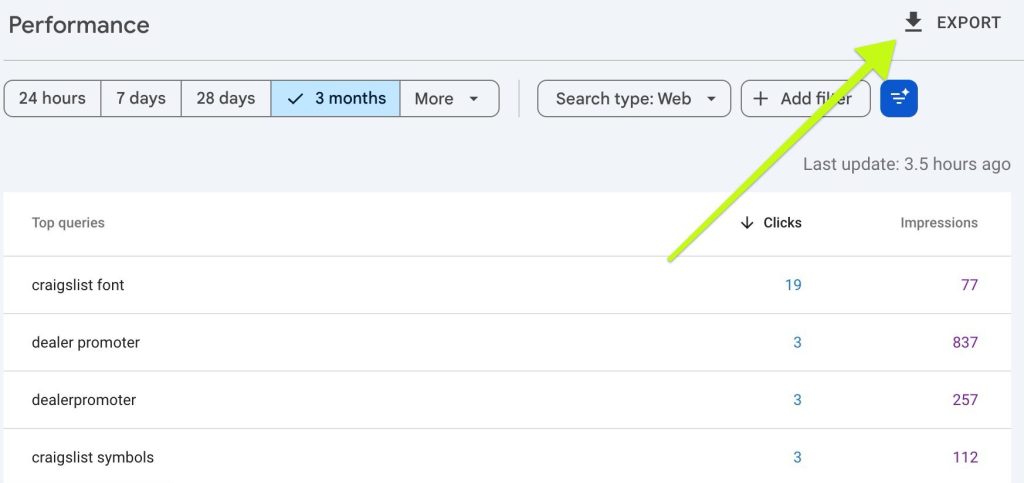
- Open Google Search Console and click on “Performance” on the left menu.
- The default time period is 3 months. That can be adjusted using the filters to select a longer timeframe if your website is not showing much data.
- Click on “Export” in the upper right corner and “Download CSV.”
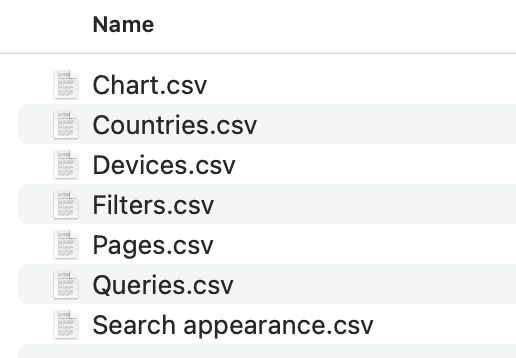
- The download will be multiple files zipped together.
The Pages.csv and Queries.csv files are the key. It is the raw language your customers use when they search.
You can jump to the next step without opening these files, but the first time it can be helpful to see how the raw data looks.
Step 3 – Find The Best Search Opportunities
Instead of manually sorting and scanning hundreds of rows, we will let AI handle the heavy lifting.
You can use ChatGPT, Claude, Gemini, or another large language model. The process is the same.
- Open your AI tool
- Upload the “Pages.csv” and “Queries.csv” files you exported from GSC
- Give the AI clear instructions on how to process the search engine data using the following prompt template
I am a small business owner with the website [example.com] and this is my Google Search Console data for the last 3 months.

1. Find search queries where my average position is between 8 and 20 and impressions are above 500.
2. Sort them from most impressions to least.
3. For each one, explain in simple language why it is a good opportunity and what I should change on my page to get more clicks and better rankings.

I primarily provide [products/services] with a focus [industry/type] customers in [your target city and region]. Use that context in your advice.
On the Dealer Promoter Pro project, this type of prompt immediately surfaced search phrases like:
- “search all of craigslist”
- about 7,800 impressions and only 7 clicks with an average position around 12
- “how to search craigslist for multiple keywords”
- about 7,700 impressions and 0 clicks with an average position around 9
- “how to add hidden keywords to craigslist”
- about 7,500 impressions and 0 clicks with an average position around 9
These are enormous missed opportunities that AI can spot FAST. The site is already on the edge of page one for highly relevant searches but almost nobody is clicking through.
The most important part of using AI to improve SEO is the improvements section. The heading for the recommendation section(s) will differ for each AI model.
Your results will only start to change as you implement these improvements. However, it’ll take time. Search engines are SLOW to change. This can take months but once you start getting results, they tend to be very consistent.
Step 4 – Maximize Valuable Queries
If there are particular queries from the previous step that your business values a lot, this step is a great way to get more comprehensive recommendations.
For each query, here are the steps:
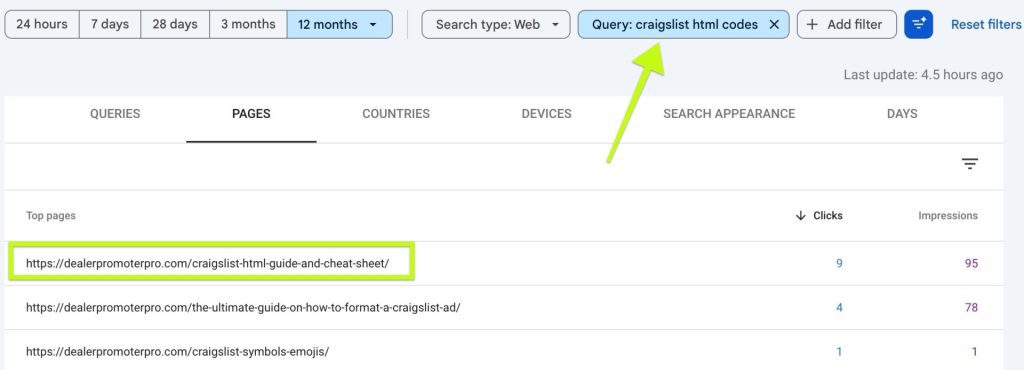
- Within Google Search Console, go to Performance and click the query to filter all data specifically to this query
- Switch to the Pages tab to see which page is ranking
- Copy that URL (aka hyperlink)
Then I give AI all of that context with the following prompt template.
You are my SEO helper.

I want to optimize for the following search query from my Google Search Console data.

Search Query: [ENTER SEARCH QUERY]
Here is the URL that ranks for this query:
[PASTE PAGE URL]

Here is a quick description of my ideal audience:
[Example: used car dealers who post inventory on Craigslist nationwide]

1. Explain why people might not be clicking this result even though it is near page one.
2. Suggest a better page title and meta description that match the search intent.
3. Suggest one new section or FAQ to add that would make this clearly the best answer to this search query.

Keep your advice concrete, short, and actionable.
For “craigslist html codes” on Dealer Promoter Pro, AI came back with things like this:
- People searching craigslist html codes want fast copy paste snippets. Your page title and intro feel like a guide or article, not an instant cheat sheet.
- Searchers want “paste this and it works.” If the title or meta does not scream that, they click a simpler looking result.
- Heavy equipment and auto dealers do not immediately see that this is built for their inventory listings. It looks generic.
These are great insights. Don’t hesitate to use follow-up prompts with the AI model to give it more clarity or to get more details for each insight.
Step 5 – Brainstorm Content With AI
Now that you know what is wrong, let AI help clear writer’s block and brainstorm ideas.
Here is a practical prompt using the same “craigslist html codes” example.
Using everything you learned above, please:

1. Write a new page title for this page that makes it very clear people can copy and past these simple html codes to create better craigslist ads faster.
Limit it to about 55 characters.

2. Write a meta description that clearly invites a click and mentions that this is a simple, safe way to optimize Craigslist ads quickly.
Limit it to about 150 characters.

3. Write a short new section for the page called:
"Craigslist html codes for vehicle listings"

In that section, explain in simple language how the tool works and any limitations. Write this like you are explaining it to a busy small business owner who posts on Craigslist often.
If you don’t like the response, tell the AI model to “Generate 3 more options” and pick the one that you will feel will resonate most will your target audience.
Step 6 – Optimize Top Content Further
Expand content where you already win
In the original article, I talked about protecting the top spots you have already earned. That still matters.
Dealer Promoter Pro is a good example here. In the GSC data, we saw queries like “craigslist emojis” garner the top spot.
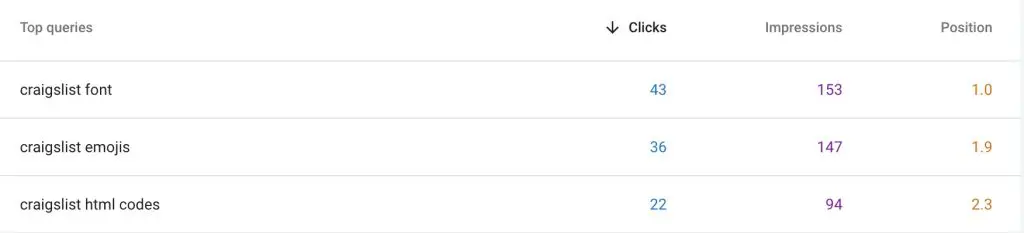
In other words, that page already owns the top spot and pulls in a healthy share of clicks.
Instead of moving on, we can use AI to expand that win into a small content cluster.
Here is how.
- Copy the content of the page from your website that ranks highest for that query
- Ask AI to look at your ranking data for all related queries
- Have it suggest related topics and questions that you have not covered yet
Prompt example:
My website currently ranks highly for [SEARCH QUERY]

Here is the current content:
[PASTE CONTENT]

1. Suggest 3-5 long-tail keyword phrases with the search query above used as the base.
2. Suggest subheadings for each of these keyword phrases and include a short draft paragraph for each.
Keep the language friendly and simple.
I used the example “craigslist emojis” and AI gave back these suggestions:
- best emojis for craigslist ad titles
- how to add emojis to craigslist ads
- craigslist emojis not showing correctly
Each of these were relevant and solid ways to expand an article that is already performing well.
For the AI content suggestions, keep in mind that these shouldn’t be used directly. Add your personality, experience, expertise, and some intrigue!
Step 7 – Theme Clusters
Look for “theme clusters” that AI can group and prioritize
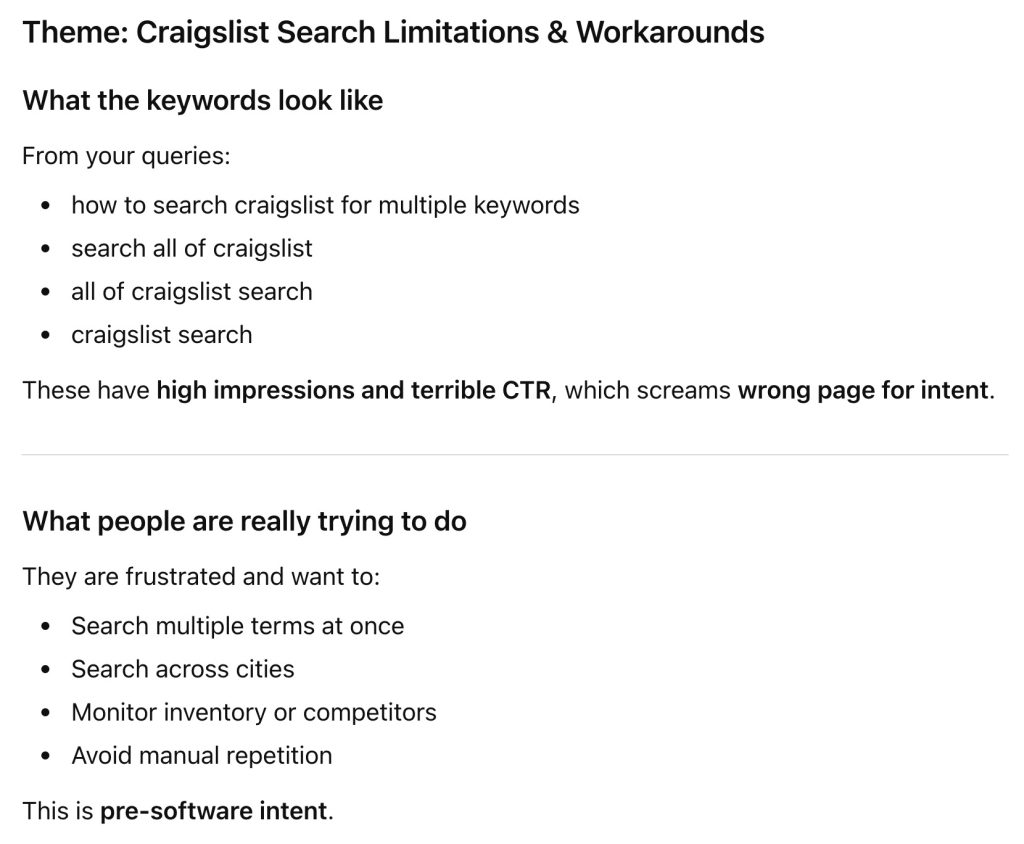
When Nate and I dug into the Dealer Promoter Pro data, one pattern jumped out. There were large clusters of queries around the same general topic.
For example, everything around “keywords” on Craigslist:
- “how to search craigslist for multiple keywords”
- “how to put keywords in craigslist ad”
- “add keywords to craigslist post”
- “craigslist keywords list”
- “keywords for craigslist ads”
- “how to hide keywords on craigslist”
Many of these had thousands of impressions but very few clicks and a wide range of positions.
Instead of treating each query separately, AI can cluster them and propose a single strategy.
Prompt example:
Use the attached Queries.csv and Pages.csv files to find cluster of keywords that are closely related and could be combined into one strategic page.

1. Group these into logical themes.
2. For each theme, tell me:
   - What people are really trying to do.
   - What one "pillar" page I should create or improve to serve that theme.
   - What smaller supporting pages or FAQs could branch off of that main page.
3. Prioritize the themes based on where I can get the fastest win given impressions and current positions.
Explain this as if I am a small business owner with limited time.
The following image shows one of the strategies AI recommended.
These fragmented pages should yield stronger results together. Often, content ranks weakly for many keywords that we ignore. When strategically combined, we can present a strong article to compete more directly for many closely related searches.
AI to Improve SEO Using Proven Methods
This is the same Google Search Console SEO strategy I’ve used for years but streamlined with AI. These new tools make it 10x faster to analyze data and you can get specific recommendations included as a bonus.
It can still be a bit overwhelming. Most small businesses do not have the time to rebuild their entire content strategy. That is okay.
Instead, create a plan to make small improvements at minimum every week. I like to pick a specific time block each week on the same day to keep things consistent.
Here’s a prompt to create a your weekly SEO strategy.
Create a plan based on the previous SEO analysis to help me make improvements to our website within a 4-hour time block each week. Prioritize the improvements that will be the easiest to implement with the highest impact.

For each week tell me:
   - the query
   - the page that ranks for that query
   - what is wrong with the current result
   - exactly what section or paragraph I should add or improve
   - tell me how I can best leverage my expertise, experience, and authority to make these improvements
That is one small improvement each week. Over a year, that is fifty meaningful improvements without a huge time commitment.

