
How to get Google Reviews for Local SEO Success

By Brad Chancellor | April 1, 2025 | Client Resources, Strategy | Reading Time: 11 minutes
If you run a local business, you’ve probably heard that Google Reviews are important—but what you might not know is just how much they can impact your visibility and growth. Learning how to get Google reviews for local SEO isn’t just a nice-to-have—it’s one of the most powerful (and free!) ways to improve your rankings and build trust with potential customers.
In this guide, we’ll walk you through why reviews matter, how they connect to your Google Business Profile, and simple strategies to help you collect more of them—without it feeling awkward or forced.
Whether you’re just getting started or want to improve your current review game, you’ll find tips here that are easy to follow and actually work.
Table of Contents
In a Hurry? Here’s the Quick Version.
We get it—you’re busy running a business, wrangling emails, and wondering where your coffee went. If you don’t have time to read the whole article (though we think you should 👀), here’s the TL;DR with the most important stuff:
- Google Reviews help you show up in local search results and look trustworthy to potential customers. More reviews = better visibility and more clicks.
- Your Google Business Profile needs to be claimed and fully filled out before you start asking for reviews.
- Happy customers won’t leave reviews unless you ask—and that’s totally okay! Ask in person, by email, by text, or with a QR code.
- Don’t ask everyone all at once. Spread it out for a steady flow of feedback (Google likes that better, and so will your future customers).
- Be nice to all reviewers—even the grumpy ones. Reply to every review with professionalism and warmth.
- If you make something right for an unhappy customer, it’s okay to kindly ask if they’d consider updating their review.
- Most businesses should aim for an average rating of 4.0 or higher—but don’t stress over a few 3- or 4-star reviews. They make your profile look real.
Still with us? Awesome. Now let’s get into the nitty-gritty of why reviews matter and how to collect them the right way.
Why Google Reviews Matter
If you’re trying to get more local customers to find and trust your business online, Google Reviews are kind of a big deal. They do way more than just sit on your Google Business Profile—they actually help you show up higher in search results and give people a reason to choose you over the other guy down the street.
Your Google Business Profile = Your Online Storefront
Think of your Google Business Profile (formerly called Google My Business) as your online storefront. It’s what pops up when someone searches for your business or types in something like “pizza near me” or “best chiropractor in town.”If your profile is claimed, verified, and filled out with the right info (like your hours, services, and photos), Google is more likely to show it in the search results—especially in that magic Local Pack (this is the top 3 listings below the map). But even if your profile is perfect, it won’t get the spotlight it deserves without good reviews.

Google Reviews Help You Show Up Higher
Here’s where it gets interesting. Google looks at a bunch of things when deciding which local businesses to show first, and reviews are one of them. In fact, reviews can affect:
- How high you rank in local search results
- How trustworthy your business looks to new customers
- How often people click on your listing
Here’s what matters most when it comes to reviews:
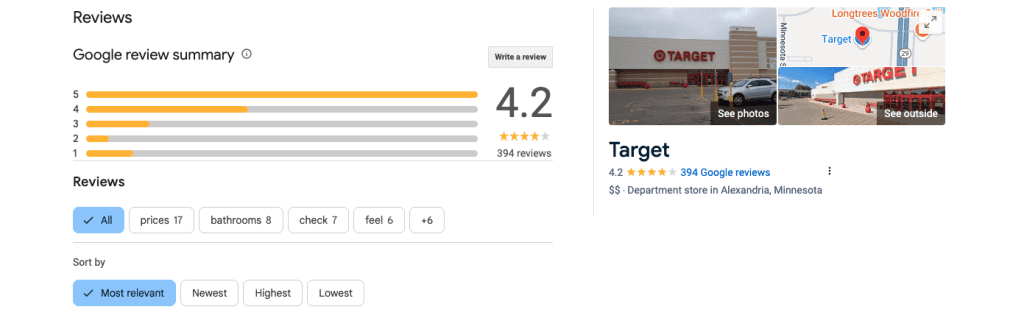
- How many you have
- How recent they are
- What your average star rating is
- What people actually say in the review (especially if they mention what service or product they used)
So, if you and your competitor both have similar businesses, but they have 50 recent 5-star reviews and you have 8 from two years ago… Google (and your customers) are probably going to pick them first.
Learn how Google considers reviews as a key factor in local search rankings.
Real People Trust Real Reviews
Let’s be honest—we all read reviews before we buy something or try a new place. And your customers are doing the same thing. Google Reviews are like modern-day word of mouth. When people see that others had a great experience with your business, they’re way more likely to trust you.
And it’s not just the rating that matters. Most people read at least a few reviews to get the full picture. Are you friendly? Fast? Easy to work with? Do people keep coming back? How do you reply to your reviews, good or bad? Good reviews help tell that story—and help turn browsers into buyers.
Laying the Groundwork for Review Collection
Before you start asking customers to leave you a Google Review, there are a couple of key things to get in place. Think of this as setting the stage—if you skip these steps, it’s kind of like inviting people to a party before you’ve cleaned the house or made any snacks. We all have bad memories of these parties.
Make Sure Your Google Business Profile Is Set Up and Ready
First things first—make sure your Google Business Profile (GBP) is claimed and fully filled out. If you’re not sure whether your business has one (or if you have access to it), just Google your business name and location. If it pops up with a “Claim this business” link, you’ll need to go through the setup process. It’s free and totally worth it.
Once you’re in, double-check these basics:
- Your business name, address, phone number (a.k.a. NAP)
- Website link
- Business hours (especially holiday or seasonal hours)
- Categories (make sure they match what you actually do!)
- Photos—real ones of your space, products, team, or work
Why does this matter? Because when someone leaves you a review, it shows up on this profile—and that profile is often the first thing new customers see. A clean, complete profile builds trust and makes it easy for people to take the next step (like calling, booking, or visiting your website).
Need a hand getting all of that dialed in? We offer a Regional SEO + Google Business Profile Optimization service that takes care of setup, cleanup, and best practices, so you can get found more easily by the people in your community.
Give People Something Worth Reviewing
Here’s the honest truth: you don’t get great reviews by just asking for them—you get them by earning them. That means delivering a good experience every time, whether you’re selling smoothies or building websites.
You don’t have to be perfect, but you do need to be consistent. People are much more likely to leave a positive review if:
- You’re friendly and helpful
- Their experience feels easy and smooth
- You follow through on what you promised
- You made their day a little better
If you have a team, talk to them about why reviews matter. Share the goal and get everyone on board. Something as simple as a smile, a thank-you, or a little extra effort can lead to someone thinking, “Yeah, I’d leave them a review.”
More from Google on Google Reviews >
Strategies for Collecting Google Reviews
Now that your Google Business Profile is looking sharp and you’re delivering a great experience to your customers, let’s talk about how to actually get more Google Reviews—without it feeling awkward, spammy, or like you’re begging.
The good news? Most happy customers are totally willing to leave a review—they just need a little reminder and an easy way to do it.
Just Ask (Really—It’s Okay!)
We know asking for reviews can feel a little uncomfortable at first, but it doesn’t have to be weird. If you’ve done a great job (like we know you have), most people are happy to share their experience—you just have to remind them by asking.
Here are a few simple ways to do that:
- In person: “Hey, if you had a good experience today, would you mind leaving us a quick Google Review? It really helps us out!”
- In a follow-up email: Send a short thank-you email after a purchase or appointment, with a friendly ask and a direct review link (more on that in a sec).
- By text: If you text with clients, you can drop the link there too! Keep it short and friendly.
- On printed materials: Receipts, business cards, postcards, or even signage can include a review request with a QR code.
The key? Make it feel like a genuine “thank you,” not a sales pitch.
Make It Super Easy to Leave a Review
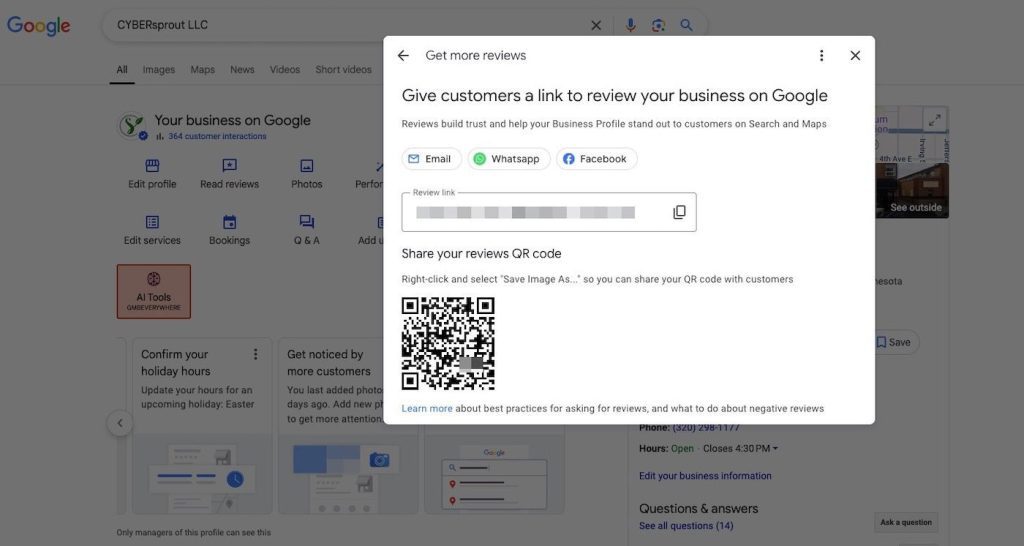
Don’t make customers go hunting for where to leave a review—give them a direct link. Here’s how:
- Go to your Google Business Profile Manager.
- On the Home tab, scroll until you see “Get more reviews” or “Ask for reviews”.
- Copy that link—it sends people straight to your review form!
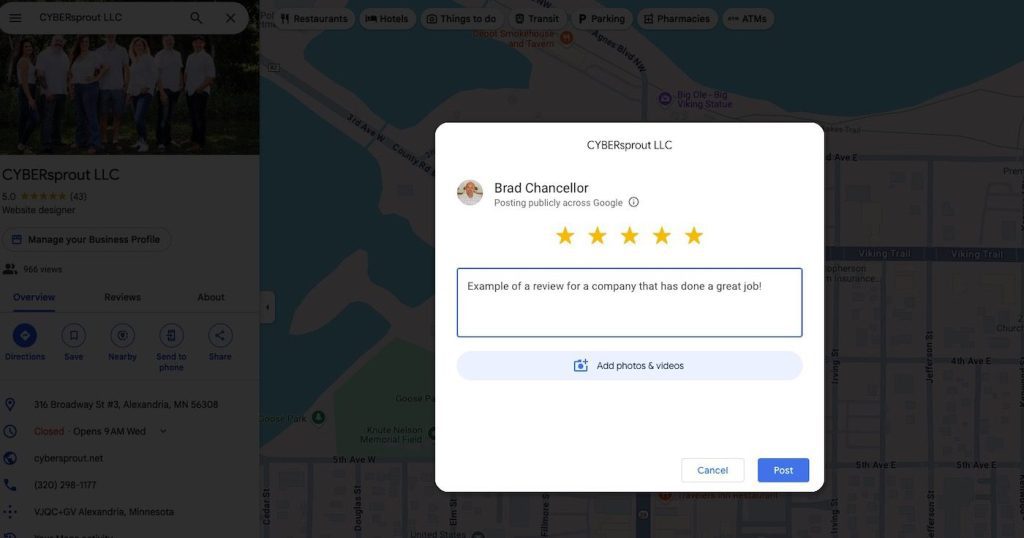
The direct link opens a new Google Review window for the customer automatically so that they don’t have to hunt down where to find the option.
You can add this link:
- To your email signature
- On your website
- In text messages or email campaigns
- As a QR code near your checkout, on business card sized review cards you leave after service, or on flyers you leave customers at the job site.
The easier it is, the more likely people are to follow through.
What is a QR code?
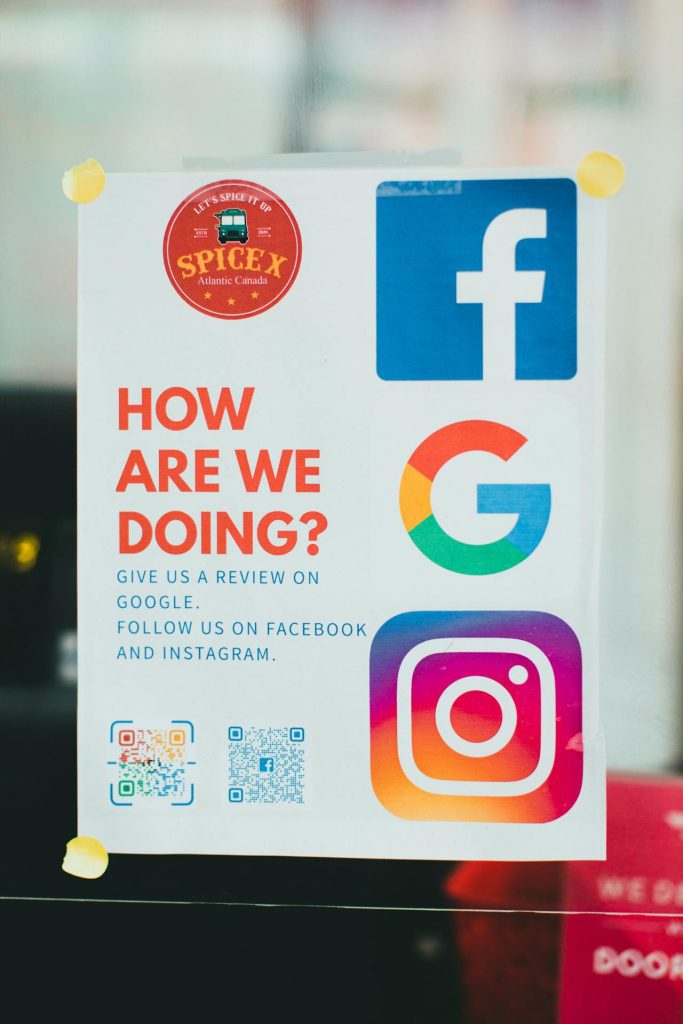
A QR code is like a barcode that you can scan with your smartphone’s camera. When scanned, it instantly takes someone to a specific webpage—like your Google Review form. It’s a quick and touch-free way to help customers leave a review without having to type in a long link. Just point, scan, and go!
Get Your Team Involved
If you have a team, train them to ask for reviews during natural conversations with happy customers. It could sound like:
“We’re really trying to grow our Google presence—if you had a good experience, would you mind leaving us a quick review? It only takes a minute.”
It’s helpful to role-play a bit so everyone feels confident. You can even turn it into a friendly internal challenge to see who gets the most reviews each month (just don’t incentivize customers directly—more on that in Section 4).
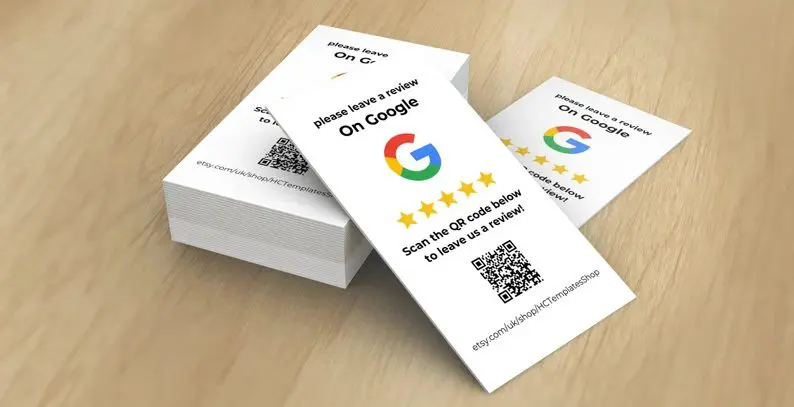
Like we discussed in the previous section, you can even give the team printout flyers or ‘Leave us a review’ business cards with the QR code to make it that much easier for both your team and the customer.
Don’t Forget Your Superfans
You probably already have a handful of loyal customers who love you. These folks are your best bet for awesome, thoughtful reviews.
Make a list of your repeat clients, biggest fans, or anyone who’s sung your praises before—and personally ask them for a review. A quick, genuine message like “We’d really value your feedback on Google!” can go a long way.
That said, try not to ask everyone all at once. Instead, spread out your review requests over time to create a more natural cadence. Google may flag a sudden spike in reviews as suspicious—and honestly, a steady stream of new reviews looks better to potential customers, too. Think of it like watering a plant regularly instead of dumping a bucket on it once a month.
Staying Compliant and Avoiding Penalties
We get it—when you finally start getting some momentum with Google Reviews, it’s tempting to want to speed things up. But before you go full throttle, it’s important to understand what not to do. Google has clear rules when it comes to reviews, and breaking them—even accidentally—can lead to reviews being removed or, worse, getting your profile flagged.
What Not to Do (Even If It Seems Harmless)
Here are a few review-asking “don’ts” to keep you on the right track:
- Don’t buy reviews. Paying people (even with gift cards or discounts) to leave a positive review is against Google’s guidelines. It may seem like a shortcut, but it can lead to serious consequences—including getting your reviews wiped out. Even if you think they’ll never find out…we’ve seen it happen.
- Don’t leave fake reviews. Never write your own reviews or ask friends and family to leave one unless they’re actual customers. Google’s systems are pretty smart and can usually detect patterns.
- Don’t ask for only positive reviews. It’s okay to ask for feedback, but make sure you’re asking for honest reviews—not just 5-stars. Trying to filter or cherry-pick can backfire. We’ll cover how to address negative reviews a little later on should you happen to get one.
- Don’t use review “gating” tools. Some platforms used to send out surveys first and only direct happy customers to Google. That practice (called gating) is no longer allowed and could get you in trouble with Google if you’re caught.
The golden rule? Keep it honest, organic, and customer-driven. Make sure you always follow Google’s review guidelines.
Encouraging Feedback the Right Way
You can (and should!) still encourage happy customers to share their experience—you just want to do it in a way that doesn’t feel forced or filtered.
Here are a few ways to stay on the safe side:
- Ask all customers for feedback, not just the ones you think had a perfect experience.
- Make it clear that you’d love an honest review—no pressure, no expectation.
- Use neutral language in your asks like: “We’d really appreciate your feedback on Google—it helps others learn what to expect!”
And remember: a mix of reviews (including the occasional 3 or 4-star one) actually makes your profile look more legit. If you’ve got 100 perfect 5-star reviews with no variation, people might question whether they’re real.
That said, you do want to keep your rating in a healthy range. Most businesses should aim for an average of 4.0 stars or higher. In fact, ratings between 4.2 and 4.7 tend to earn the most trust. A few imperfect scores won’t hurt you—they’ll actually help your reviews look more authentic. What will be important is how you reply to them which we are about to get into.
Responding to Reviews (Yes, Even the Bad Ones)
You got the review—awesome! But your job’s not done quite yet. Responding to your Google Reviews is just as important as collecting them. Whether the feedback is glowing or a little rough around the edges, how you reply can make a big difference in how people see your business.
How to Respond to Positive Reviews
Positive reviews are like little digital high-fives. Don’t leave your happy customers hanging!
Here’s why replying to good reviews matters:
- It shows you’re paying attention and appreciate your customers.
- It helps build loyalty and keeps people coming back.
- It adds fresh content to your Google Business Profile (bonus SEO points!).
And here’s a pro tip: If the review is a little vague—like “Great service!” or “Awesome place”—you can naturally work in a few keywords when you reply. This helps reinforce what your business does in Google’s eyes, without sounding spammy.
For example:
- “Thanks so much, Jenny! We’re glad you had a great experience with our window installation team—let us know if you ever need anything else.”
- “We appreciate the review, Mark! Our chiropractic team is always here to help if your back pain flares up again.”
Just keep it conversational and relevant to what the customer actually experienced.
You can also use the opportunity to reinforce what makes your business great:
- “Thanks for the shout-out! Our team prides itself on fast service, and we’re glad it stood out to you.”
How to Respond to Negative Reviews (Without Panicking)
Negative reviews happen to everyone. The goal isn’t to avoid them entirely—it’s to handle them well when they come in.
Here’s how to respond without making things worse:
- Stay calm and professional. Don’t take it personally or get defensive (even if the review feels unfair).
- Acknowledge their concern. A simple “We’re sorry to hear about your experience” goes a long way.
- Take the conversation offline. Invite them to reach out so you can make it right.
- Be brief and respectful. You’re not just replying to the reviewer—you’re showing future customers how you handle issues.
Example:
“Hi Alex, we’re sorry to hear that your visit didn’t meet expectations. That’s not the experience we aim to provide. We’d love a chance to talk more and make it right—please feel free to call us at [phone number] or email [email].”
Bonus tip: If you do resolve the issue and the customer is happy with how you handled it, it’s totally okay to ask if they’d consider updating or removing their review. Most people are reasonable and will appreciate the fact that you cared enough to fix things.
Just keep the ask low-pressure:
“We’re so glad we could get things sorted out. If you feel comfortable updating your review to reflect your experience, we’d really appreciate it—but no pressure!”
Even if they don’t change it, your thoughtful public response still speaks volumes to potential customers.
Wrapping It Up
At the end of the day, Google Reviews aren’t just about stars—they’re about trust, visibility, and showing potential customers why they should choose you. Whether you’re just getting started or looking to grow your review count, a little consistency and the right strategy can go a long way.
The good news? You don’t have to figure it all out on your own.
If you’d like help setting up your Google Business Profile, improving your local search visibility, or building a solid review strategy, we’ve got your back. Our Regional SEO + Google Business Profile Optimization service is designed to take the guesswork out of the process—so you can focus on doing what you do best.
Need a hand? Reach out to our team anytime—we’d love to help your business shine online!

